A free form builder
with logic, uploads
and signatures
Pick one of 32 templates or start blank, drag in questions, set the look, and watch the real form update as you go. It all stays in your browser — you only give an email when you press Publish.
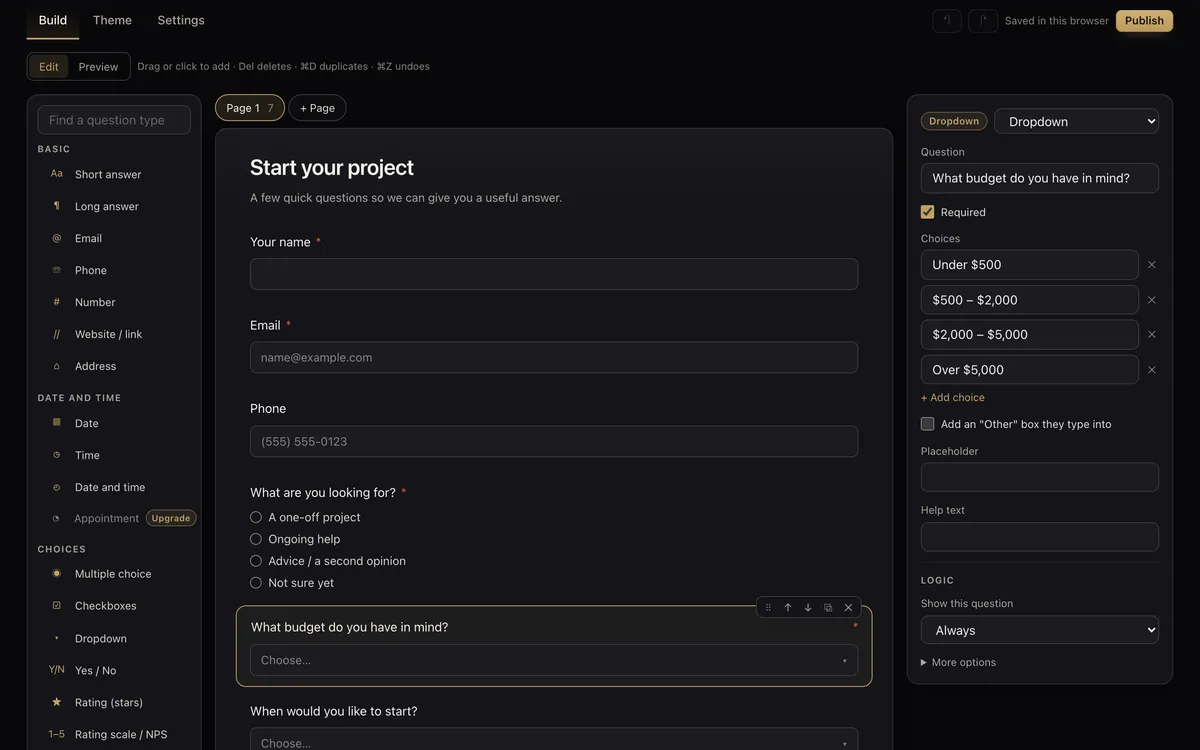
Watch how it works
Build a form for free, publish it with your email, and see every answer in your free account.
1:20 · narrated, with on-screen captions
What you get on the free plan
The same builder our paying customers use, not a cut-down version of it.
- 27 question types — short and long answers, email, phone, address, dates and times, multiple choice, dropdowns, star ratings, 0–10 and NPS scales, grids, Yes/No, website links and hidden values.
- File upload and signatures — photos, PDFs and Office files up to 5 MB, and a drawn signature with a terms tick box for waivers and consent forms.
- Conditional logic — show a follow-up only when an earlier answer calls for it, skip pages, or swap the thank-you message.
- Calculations — a live total or score from the answers, for quotes, estimates and quizzes.
- Pages, themes and languages — split long forms into pages, choose colours, fonts, corners and a cover image, and add translations with a language switcher.
- Share it anywhere — a link, a QR code, and embed code for in the page, a pop-up button, a timed pop-up or a full page.
- See every answer — a results table with search and filters, a summary of each question, and a CSV export.
Start from a form that already works
More in the builder: onboarding, RSVP, event registration, NPS, quizzes, newsletters and others.
Three steps, one email
Build it
Choose a template or start blank. Drag questions in, edit them on the page, and undo anything with ⌘Z.
Preview it
Switch to Preview to try the real form, logic and pages included, on desktop or phone width.
Publish it
Press Publish and give your name and email. The link we send puts the form live and opens your free account with its link, QR code and embed code.
Free or paid — what changes
| Free | Starter, $49/month | |
|---|---|---|
| Forms | 3 | No limit |
| Answers | 100 a month | No limit |
| File uploads | Up to 5 MB each | Up to 20 MB each |
| Payment, product and appointment questions in a form | — | Yes |
| Booking page | 3 services, 50 bookings a month | No limit, with reminder emails and deposits |
| “Made with Fynl” link on the form | Yes | No |
| CRM, quotes, invoices, inbox, website | — | Yes |
Good to know
Answers arrive in your account and its notification bell. The AI that writes a form from one sentence works after you sign up, on your own Claude or ChatGPT API key — Fynl has no AI key of its own and charges nothing for AI use. The same free account can also hold a free booking page. Upgrading keeps your login, your forms and your bookings.
Step-by-step guides
Conditional logic, calculations, NPS surveys, intake forms, waivers, event sign-ups, embedding and more, each with a short video and a free PDF: free form builder guides.
Before you build
Is the form builder really free?
Yes. The free plan has 3 forms and 100 answers a month, with no card and no time limit. Free forms show a small “Made with Fynl” link at the bottom.
Do I need an account to build a form?
No. You build and preview the form in your browser without signing up. When you press Publish you give your name and email, and we email you a link that puts the form live and opens your free account.
Does it have conditional logic?
Yes. Any question can show only when earlier answers match, and form rules can show or hide pages, skip ahead, change a calculation, change the thank-you message or send people to another web page.
Can people upload files and sign the form?
Yes. File upload takes photos, PDFs and Word, Excel or text files up to 5 MB each on the free plan, and the signature question lets people draw their signature with a finger or mouse.
Can I put the form on my website?
Yes. Every form has its own link and QR code, plus copy-and-paste embed code for in the page, a pop-up button, a timed pop-up or a full page.
What is not included on the free plan?
Payment questions, product lists and appointment questions inside a form need a paid plan, and so does removing the “Made with Fynl” link. A booking page is included free: 3 services and 50 bookings a month, made with the free booking page tool.
Where do the answers go?
Into your free Fynl account: a results table you can search and filter, a summary with charts for each question, and a CSV export. Everyone who gives an email also becomes a contact.
Can the AI write the form for me?
After you sign up, yes, on your own Claude or ChatGPT API key. Describe the form in one sentence and it writes the questions, pages and logic. Fynl never adds its own AI key or charges for AI use.
More free tools
Your form, live in a few minutes
Templates, logic, uploads and signatures — free, with nothing to install.
Build a form free See the full portal